
Key takeaways
- Apple's Audio Intelligence beta for Apple Watch delivers four features including Live Rewind to replay conversations and Siri Recaps for automatic meeting summaries.
- The technology processes audio locally on the watch and iPhone using a secure enclave, converting speech to condensed text before any cloud involvement to avoid recording raw audio.
- Apple positioned Audio Intelligence as a privacy-respecting alternative to always-on recording wearables like Meta's AI glasses, requiring users to explicitly opt in and triggering notifications when recording occurs.
- The developer beta will progress to public beta and general availability, though Apple has not announced specific dates for the wider rollout.
Apple’s Audio Intelligence features for the Apple Watch have entered developer beta testing in iOS 27.3, arriving roughly two months after their announcement at the Surprise and Shine hardware event in September. The technology comprises four opt-in capabilities rolling out initially to Apple Watch Series 12 and Apple Watch Ultra 4 owners in the developer community. The company distributed news of the beta via press release in India, though the update had not yet reached the United States market as of announcement.
The features include sound recognition, song identification, Live Rewind, and Siri Recaps. They represent Apple’s attempt to navigate a contested space: adding AI-powered listening capabilities to wearable hardware without triggering the privacy backlash that has surrounded competing products like Meta’s AI glasses.
Sound Recognition and Song Identification
Two of the four Audio Intelligence features serve accessibility and discovery needs. Sound recognition helps deaf and hard-of-hearing users by identifying important environmental sounds: sirens, alarms, doorbells. The watch alerts the wearer to these critical audio cues through vibration and notification.
Song identification taps Apple’s Shazam service to recognize music playing in the background and display the song name and artist on the watch face. Both features run locally on the watch without requiring cloud processing.
Live Rewind: Rewinding the Last 15 Seconds
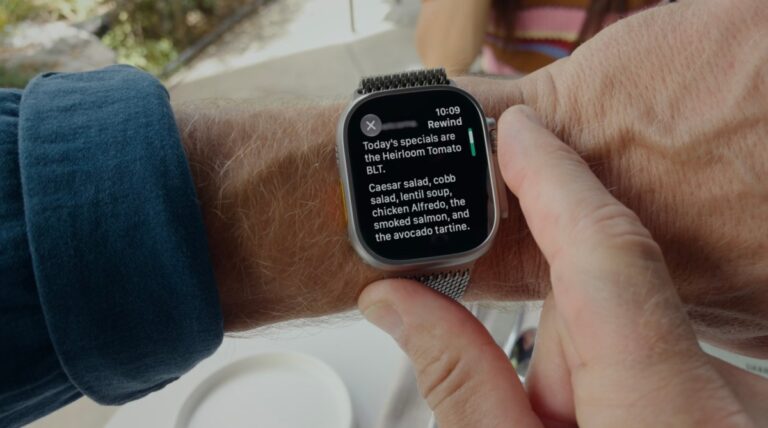
Live Rewind lets users revisit a conversation they may have missed or partially caught. Double-pressing the Apple Watch’s digital crown captures the prior 15 seconds of audio and displays it as text on the watch face. The gesture triggers an audible chime and animation meant to signal to nearby people that recording has occurred. Apple included this transparency mechanism to address privacy expectations around always-listening devices.
Visibility and Auto-Deletion
The text snippet remains visible for 30 seconds before automatically deleting. Users can save snippets to the Siri app, which shipped with iOS 27, for later reference, or dismiss them by taking no action. The feature includes an “Ask Siri” option below the text, enabling users to ask follow-up questions about terms or concepts they heard but didn’t fully understand, such as a restaurant’s menu item or a technical concept mentioned in passing.
Siri Recaps: AI Summaries of Conversations
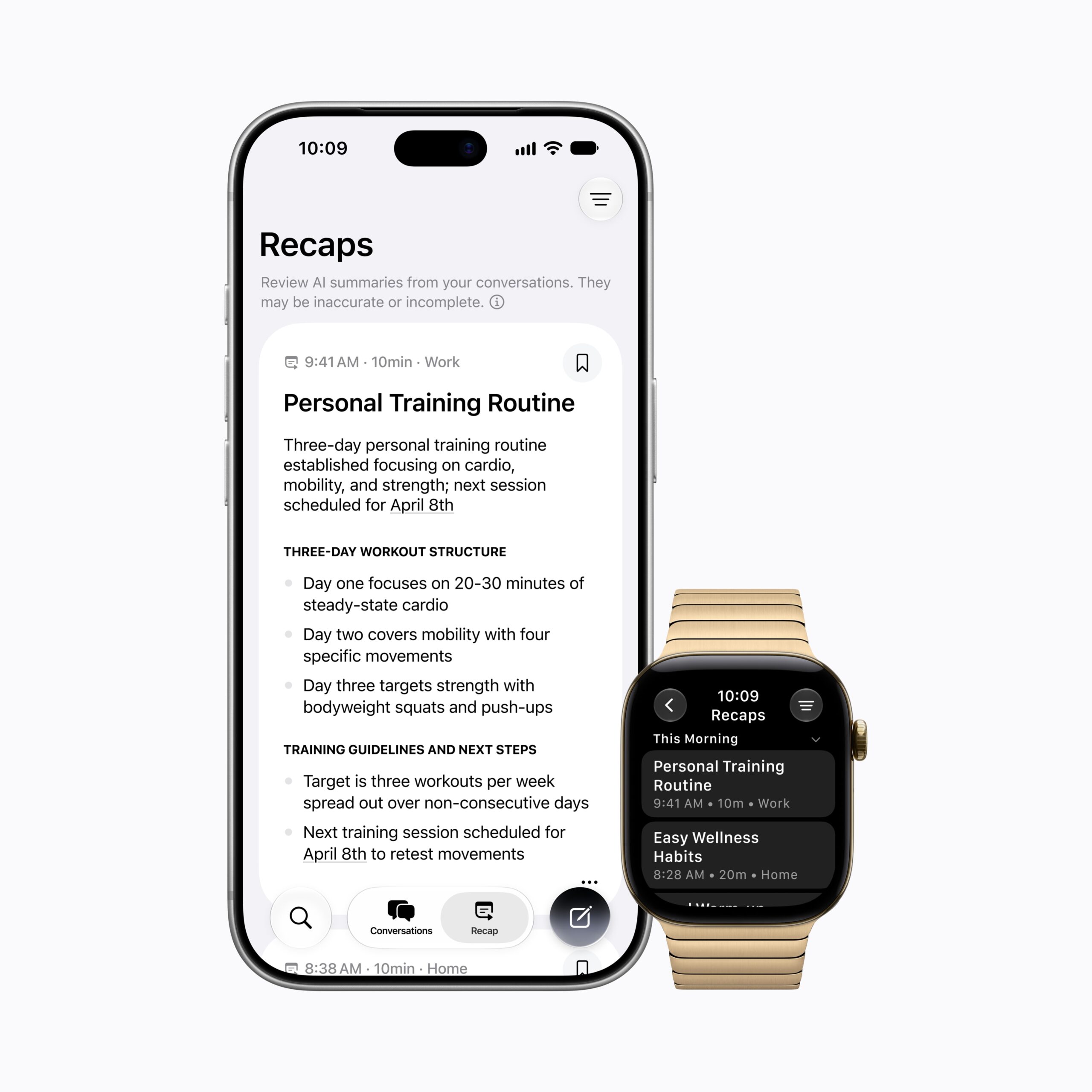
Siri Recaps extends the listening capabilities further. Rather than saving audio or generating word-for-word transcripts, it produces brief summaries highlighting key points: dates, deadlines, pricing, action items. Apple describes it as an automated equivalent to taking notes during a meeting, capturing essentials without reproducing the full conversation.
The feature targets scenarios where taking notes isn’t practical: work meetings, parent-teacher conferences, personal training sessions. The watch won’t record when users are listening to music through headphones or using noise cancellation, preventing accidental capture of unrelated audio.
Scheduling and Daily Review
Users can manually enable Siri Recaps or configure it to run on a schedule, limiting it to work hours, for instance, or disabling it at night. The Control Center allows users to toggle the feature off at any time. At the end of each day, users review the summaries the watch generated and choose which to keep, save to the Notes app, export to the Journal app, or discard. Any unsaved recaps automatically delete after seven days. A reminder to review recaps also appears the next morning when users first unlock their watch.
Sensitive Data Filtering
Apple designed Siri Recaps to exclude sensitive information: government-assigned identifiers, financial and authentication data, personal identifiers, and language suggesting self-harm. The goal is to preserve utility for note-taking while filtering out data that could pose privacy or security risks.
Privacy Through Hardware and Architecture
The technical design distinguishes Apple’s approach from competitors offering continuous recording. Audio Intelligence relies on the Apple Watch Series 12’s S11 chip, an on-device microphone, Apple Intelligence models, and Apple’s Private Cloud Compute service. The S11 contains a secure enclave, a hardware-protected memory space isolated from the operating system, where raw audio is processed without becoming accessible to other software or to Apple.
On-Device Processing and Secure Enclaves
Lightweight AI models on the S11 detect whether the wearer is participating in a conversation. When detected, audio transfers to the secure enclave on the paired iPhone rather than remaining on the watch. The iPhone then performs on-device processing, converting audio into condensed text by removing filler words and producing a compressed version of what was said. This condensed text, not raw audio, is encrypted and sent to Apple’s Private Cloud Compute service.
Private Cloud Compute generates the recap and immediately deletes it along with all intermediary summaries created during processing. The final recap returns encrypted to the iPhone and remains inaccessible to Apple. When synced across a user’s Apple devices, the recap stays encrypted.
Data Paths for Both Features
Live Rewind follows a comparable path: audio transfers to the iPhone’s secure enclave for processing into text snippets, remaining on-device unless the user explicitly saves it to Siri. No data travels to cloud servers for this feature.
Apple says neither feature impacts watch or phone battery life, and all data pathways use encryption to prevent interception or eavesdropping.
Timeline and Public Rollout
The developer beta represents the first phase of broader availability. Apple plans to release Audio Intelligence to public beta testing after gathering developer feedback, then make it generally available to all eligible Apple Watch owners. The company has not announced specific dates for these later stages.
The features emerge amid ongoing scrutiny of AI audio capabilities in consumer wearables. Meta’s AI glasses, which can record video and audio, sparked significant backlash, making privacy assurances a central concern for any company adding recording functionality to wearables. Apple’s emphasis on notification signals, local processing, and explicit opt-in positions Audio Intelligence as a privacy-respecting alternative to cloud-streaming recording devices. By requiring users to double-press to trigger Live Rewind and choose which Recaps to save, Apple places control in the wearer’s hands rather than creating persistent always-on surveillance.
Source: TechCrunch
Frequently Asked Questions
What does Live Rewind do on Apple Watch?
Live Rewind captures the last 15 seconds of audio when you double-press the Apple Watch's digital crown, displaying it as text on the watch face. The snippet auto-deletes after 30 seconds unless saved to the Siri app, and the gesture triggers a chime and animation to signal nearby people that recording occurred.
How does Siri Recaps work without transcribing conversations?
Siri Recaps generates summaries with bullet points highlighting key information like dates, deadlines, and action items, without identifying speakers, saving raw audio, or providing word-for-word transcripts. Unsaved recaps automatically delete after seven days.
Where is raw audio processed for privacy?
Raw audio is processed in the Apple Watch's secure enclave, a hardware-protected memory space, before being converted to condensed text on the iPhone. The text is encrypted before any cloud processing, and Apple's Private Cloud Compute service deletes it immediately after generating the summary.
