
Key takeaways
- Wacom's $500 MovinkPad 11 fills the gap between $30 budget tablets and $3,500 professional workstations, appealing to artists committed to digital creation but constrained by budget.
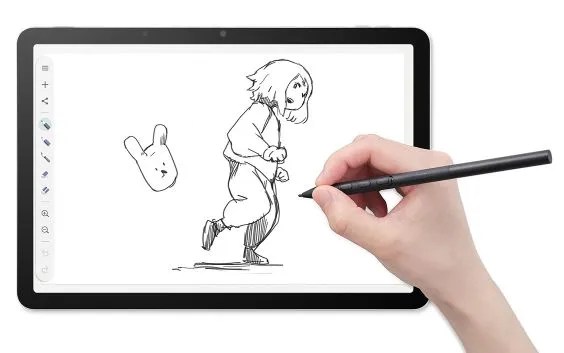
- The tablet bundles the Pro Pen 3 stylus with three programmable buttons, 8GB RAM, 128GB storage, and free Wacom Canvas software, delivering responsive stylus input without professional-grade pricing.
- Most suited to artists who prioritize portability or use digital sketching as an intermediate step before transferring work to traditional media, the MovinkPad 11 emphasizes accessibility over professional features.
Wacom, founded in 1983, has spent four decades establishing itself as a cornerstone manufacturer in the digital art hardware space. The Japanese company’s latest entry-point product, the MovinkPad 11, attempts to make tablet-based creative work accessible to artists constrained by budget while maintaining the performance standards expected from a Wacom device.
Why Digital Artists Use Tablets
Digital art creation offers a fundamentally different experience from traditional paper-and-pencil work, according to practitioners. The medium enables endless experimentation without material waste, unlimited undo functionality, and access to techniques that exist only in digital space. The community encompasses graphic designers executing precise vector work, cartoonists designing characters and comic panels, animators creating frame-by-frame sequences, and video game designers sketching concept art and environments.
Even traditional artists frequently use digital tablets as intermediary tools—sketching conceptually on screen before transferring to paper, or conversely, digitizing paper sketches on tablets for digital refinement. The flexibility of workflow, combined with the precision that pressure-sensitive stylus input enables, explains why dedicated graphics tablets remain a distinct product category rather than a niche subset of general-purpose devices like iPads.
Positioning Within Wacom’s Lineup
Price and Product Strategy
The MovinkPad series currently consists of two models. The MovinkPad 11, priced at $500, serves as the entry-level option. Above it sits the MovinkPad Pro 14, released last fall at $899, featuring premium specifications including an OLED display with 3K resolution and an expanded color gamut suited for color-critical professional work.
To understand the MovinkPad 11’s value position, consider the broader landscape: budget graphics tablets like the Huion Inspiroy H640P retail around $30, making them accessible for casual experimentation. Wacom’s own Cintiq Pro 27 costs $3,500, targeting professional studios. The Apple iPad, usable for digital art through applications and the Apple Pencil stylus, ranges up to $1,100. The MovinkPad 11’s $500 price sits strategically between budget exploration and professional-grade equipment.
Physical Specifications
The tablet measures 11.45 inches diagonally and weighs 1.3 pounds, emphasizing portability. It includes 8 gigabytes of RAM and 128 gigabytes of storage—sufficient for running creative applications smoothly and maintaining a substantial library of artwork. The device charges via USB with no integrated battery, a design prioritizing durability and eliminating a common point of hardware failure while assuming users will employ it primarily in studio environments or pair it with portable power supplies.
Stylus and Drawing Experience
Hardware and Responsiveness
The MovinkPad 11 bundles the Pro Pen 3, a 6.3-inch stylus featuring three programmable side buttons. Users can customize these buttons to trigger specific actions—eraser toggle, color picker, tool switching—based on individual workflow needs. The stylus itself feels lightweight and responsive, providing tactile feedback comparable to using a fine-tipped felt pen rather than plastic-against-glass friction.
The stylus nib is replaceable through Wacom’s accessory ecosystem at $15 per replacement pack. Different nib materials and hardnesses alter drawing texture, allowing artists to experiment: softer nibs suit painting simulations while firmer options serve precise linework and vector applications.
Software Capabilities
The MovinkPad 11 ships with Wacom Canvas, a free application providing fundamental drawing and painting tools. Users seeking more sophisticated features can purchase Clip Studio Paint, which offers advanced capabilities including pressure-response curves, multiple drawing tool types (pens, paintbrushes, sketching pencils), and numerous style variations within each category.
Because the MovinkPad runs Android, users can sync their Google account, streamlining asset organization and backup across devices without requiring proprietary storage systems.
Setup and User Experience
Setting up the MovinkPad 11 requires users to create a PIN code, a security measure that protects against unauthorized access. Users can customize their unlock preference through Settings > Security > Privacy, selecting between swipe-based unlock or disabling lock protection entirely. For users primarily concerned with protecting sensitive client work or personal creative projects, this security layer provides genuine value.
Testing with the device revealed it to be accessible even to users without prior digital art experience. A technology enthusiast unfamiliar with professional art creation managed to produce drawings over several hours on a weekend, with the stylus and software responding intuitively to user intent. This approachability—delivering creative satisfaction and meaningful output quickly—distinguishes the MovinkPad from professional workstations demanding weeks of learning before users feel comfortable.
Competitive Positioning
iPad and General-Purpose Alternatives
The MovinkPad 11’s primary competitor is the iPad, which offers a broader ecosystem of art applications and the pressure-sensitive Apple Pencil stylus. The iPad’s fundamental positioning as a general-purpose device—functioning simultaneously for productivity, media consumption, entertainment, and creative work—contrasts sharply with the MovinkPad’s specialization exclusively around digital art.
Wacom’s Specialization Advantage
Wacom’s competitive advantage emerges from four decades of focused expertise in stylus-input hardware and workflows. The company engineered the MovinkPad specifically for artists rather than adapting a general-purpose platform to accommodate creative users. This focus produces what reviewers describe as a more elegant and streamlined solution, eliminating unnecessary complexity while optimizing every interaction for stylus-based drawing.
Target Audience and Value Assessment
The MovinkPad 11 appeals most directly to individuals with demonstrated commitment to digital art creation who lack budgets for professional-grade equipment. The $500 price exceeds casual hobby budgets—potential buyers should have genuine artistic interest rather than vague curiosity. But for users already convinced of their dedication to digital drawing, the MovinkPad 11 delivers capable, specialized equipment without premium pricing.
The tablet particularly suits artists prioritizing portability, those who sketch conceptually before transferring work to paper, and professionals in geographic regions or economic situations where equipment costs represent significant financial burden. For traditional artists exploring digital sketching as an intermediate step before returning to physical media, the device eliminates the psychological weight of investing in “permanent” technology while delivering legitimate creative capability. The MovinkPad 11 won’t appeal to professional studios requiring advanced color accuracy or the general-purpose computing of iPads, but for committed digital artists with budget constraints, it represents an accessible entry point into Wacom’s ecosystem.
Frequently Asked Questions
How does the MovinkPad 11 compare in price to other digital art devices?
The MovinkPad 11 costs $500, sitting between the budget Huion Inspiroy H640P at around $30 and professional options like Wacom's Cintiq Pro 27 at $3,500. The iPad, another competing platform, ranges up to $1,100.
What stylus features does the MovinkPad 11 include?
The tablet bundles the Pro Pen 3, a 6.3-inch stylus with three programmable side buttons that users can customize for specific actions. The nib is replaceable through Wacom's accessory ecosystem for $15 per pack, allowing artists to experiment with different drawing textures.
What software comes with the MovinkPad 11?
The MovinkPad 11 ships with Wacom Canvas, a free application with fundamental drawing and painting tools. Users can purchase Clip Studio Paint separately for advanced features including multiple drawing tool types and pressure-response customization.
